Selected work

Agent systems built to solve specific business problems.

A closer look at six agent systems built around supply chain operations, sales, product configuration, field planning, scientific work and industrial decisions. Private work is described by use case, with client names and identifying details removed.

Business problemAgent systemPlatform + stackHuman control
01Supply chain operationsApplication family
Voice-led command centre

Supply Chain Operations Agent

We built a local purchasing agent for Outlook and Excel, plus a voice-first supply chain environment. A manager can ask a spoken question, follow the impact from supplier to customer and review recovery options before approving anything.

Business problem + workflow

Requests entered through a shared inbox while disruption context lived across supplier, material, production and customer records. The team needed agents that could assemble the picture quickly while preserving the tools, rules and approval steps already in use.

  1. 01

    Ask the AI voice agent about a delay or exposed commitment

  2. 02

    Trace the effect through materials, production and customers

  3. 03

    Compare recovery scenarios and purchasing actions

  4. 04

    Approve, edit or reject the action packet

Agents at work

A realtime voice agent handles the spoken briefing. Routing and recovery agents collect evidence, trace impact and prepare options so a person can make the operational decision.

A1

Voice briefing agentTurns a spoken supply question into a traceable operational briefing.

A2

Routing agentApplies company rules first and reviews only unresolved purchasing requests.

A3

Recovery agentCompares scenarios and assembles an approval-ready action packet.

What was built

  • Realtime AI voice briefings with clear AI disclosure
  • Shared-inbox routing and constrained AI triage
  • Supplier-to-customer impact tracing
  • Approval-ready recovery and escalation packets

What the business can measure

Time to trace an exposure, request-assignment time, overdue work, recovery options reviewed and manual rework.

What stays with your team

The agents cannot award suppliers, place orders, change production, approve substitutions or make customer commitments.

02Sales operationsInternal application
Native correspondence desk

Sales Opportunity Agent

The native Mac application uses research, qualification and drafting agents to prepare an editable opportunity, show the evidence, flag missing questions and draft the next email for review.

Business problem + workflow

Useful context arrived in different formats and at different stages of a sale. Staff needed one place to understand the account, test the fit, see what was missing and prepare a relevant next step.

  1. 01

    Import an email, document or clipboard note

  2. 02

    Edit the intake before creating an opportunity

  3. 03

    Compare the evidence with configurable services

  4. 04

    Review the gaps, risks and next email

Agents at work

Research, qualification and drafting agents share one evidence record. They can prepare a recommendation and a relevant email, but the seller decides whether the opportunity fits and what leaves the company.

A1

Research agentFinds company context and keeps source evidence attached to the opportunity.

A2

Qualification agentTests the evidence against configurable services and preserves uncertainty.

A3

Drafting agentPrepares stage-specific follow-up that a seller can edit, copy or save.

What was built

  • Editable intake before anything enters the queue
  • Configurable service and qualification profiles
  • Evidence, fit risks and missing questions
  • Drafts for each stage of the sales process

What the business can measure

Preparation time, follow-up turnaround, qualification gaps and opportunities that still need research.

What stays with your team

The application prepares and saves drafts. A person reviews the evidence and decides what to send.

03Product configurationConcept product
Interactive product studio

Vitrifold Product Configurator

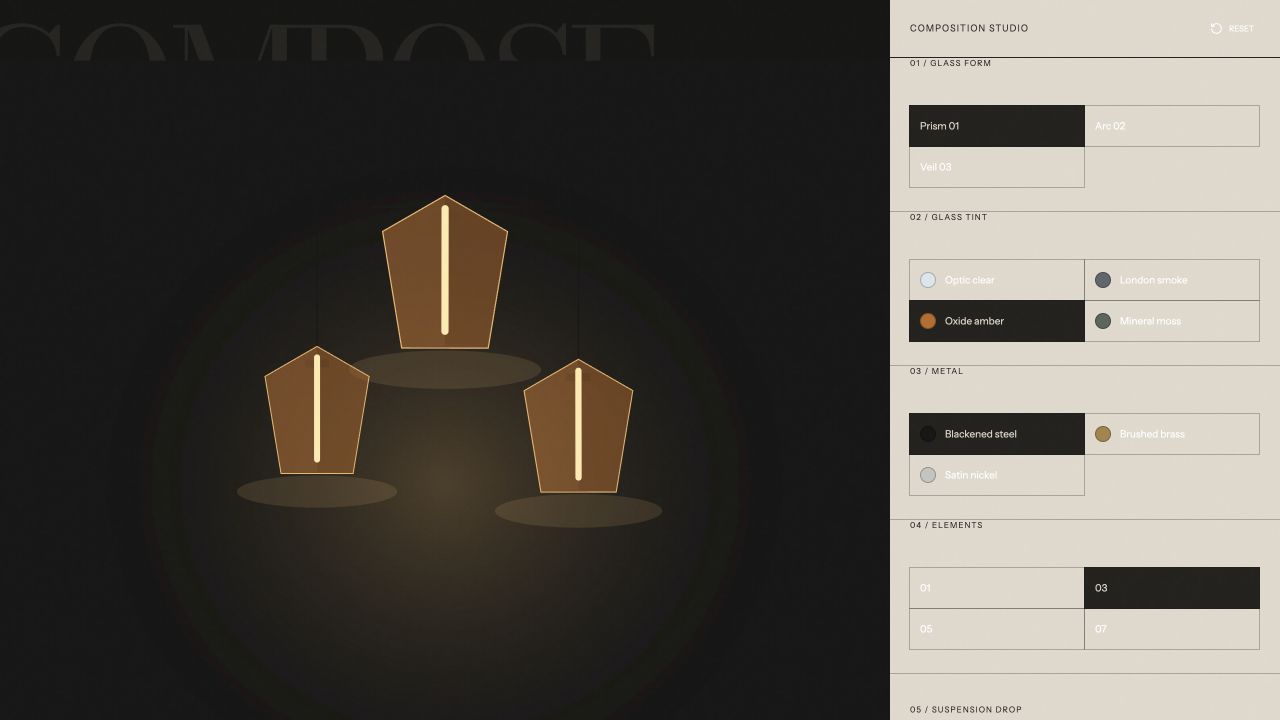
A buyer can explore options in the browser, save an image, share a configuration, download a specification and open a prepared inquiry.

Business problem + workflow

A buyer could describe the product in broad terms, but the sales team still needed the chosen form, material, finish and dimensions before they could respond with confidence.

  1. 01

    Choose the product form

  2. 02

    Set material, dimensions and finish

  3. 03

    Review the configuration as it changes

  4. 04

    Save, share, export or begin an inquiry

Agents at work

A deterministic configuration agent carries valid choices forward, compiles the specification and prepares the inquiry context. The core workflow does not need generative AI to be useful.

A1

Configuration agentKeeps form, material, finish and dimension choices in a valid state.

A2

Specification agentTurns the selected options into a readable technical summary and export.

A3

Inquiry agentPackages the configuration so sales receives a complete starting point.

What was built

  • Live product rendering
  • Configuration summary and specification
  • Image and PDF export
  • Shareable configuration and prepared inquiry

What the business can measure

Completed configurations, inquiry completeness, quote-preparation time and option changes before submission.

What stays with your team

This independently built concept demonstrates the workflow and is not presented as client work.

04Field planningConcept product
Forecast operations board

Shoremetric Operating-Window Planner

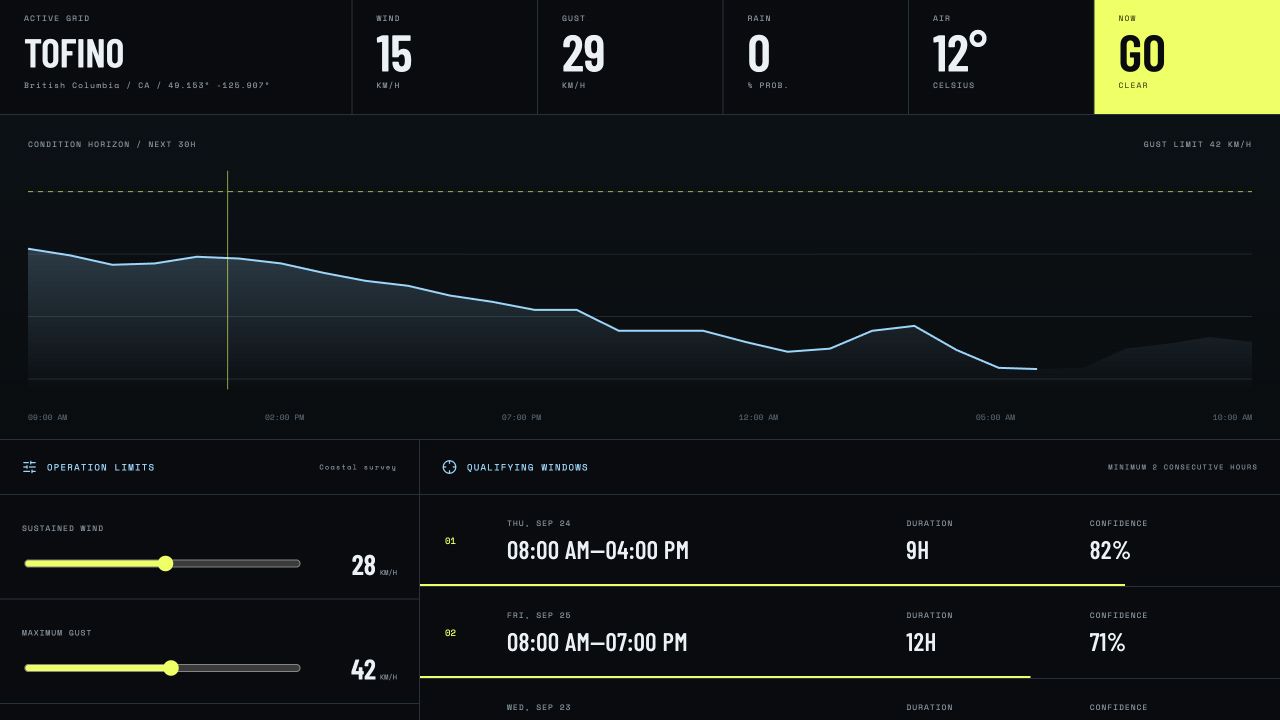
We connected forecast data with user-set thresholds so field teams can see consecutive daylight hours that meet the operating limits.

Business problem + workflow

A forecast alone did not answer the planning question. The team needed to test several conditions at once, find consecutive workable hours and share the assumptions behind the plan.

  1. 01

    Choose the location and planning period

  2. 02

    Set the operating thresholds

  3. 03

    Compare the forecast with each limit

  4. 04

    Share the workable windows and assumptions

Agents at work

A forecast agent retrieves the conditions, while a planning agent applies the operating limits and finds consecutive workable hours. A briefing agent packages the assumptions for the field team.

A1

Forecast agentRetrieves location-specific weather data for the selected planning period.

A2

Window agentTests each hour against the job limits and groups consecutive workable periods.

A3

Briefing agentCreates a shareable plan with thresholds, failures and forecast assumptions.

What was built

  • Forecast retrieval by location
  • User-set wind, temperature and weather limits
  • Consecutive daylight-window analysis
  • Shareable planning brief

What the business can measure

Planning time, workable windows found, threshold failures and changes caused by a new forecast.

What stays with your team

Forecasts support planning. Field teams still confirm local conditions and make the operating decision.

05Scientific workflowPrivate prototype
Digital laboratory runbook

Scientific Process Control Workspace

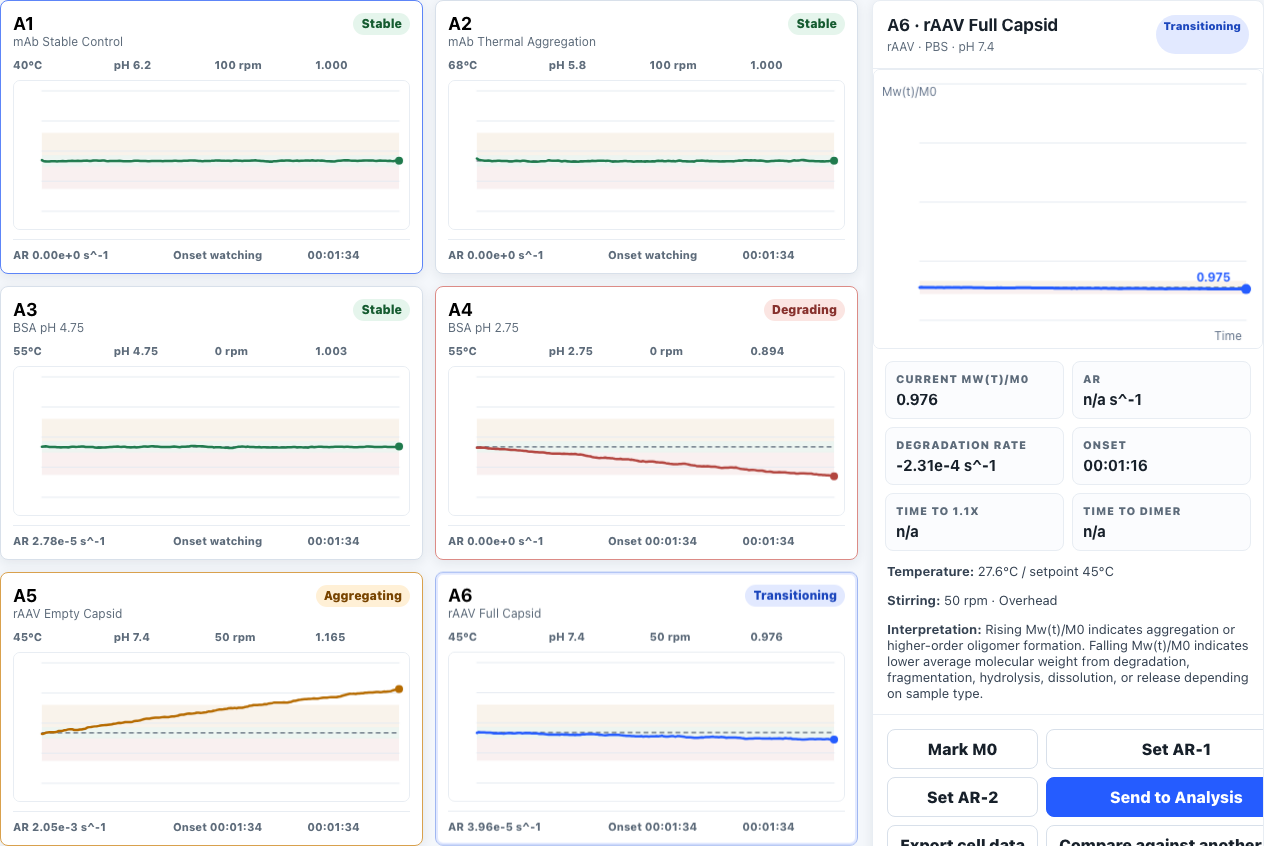
We brought setup, simulated run status, events and operator notes into one reviewable workspace. Bounded setup, observer and review agents organize the work, but the prototype does not control laboratory hardware.

Business problem + workflow

The team needed to see how a future control experience could guide setup, show a run in progress and leave a record that another scientist could review later.

  1. 01

    Prepare the run and review the setup

  2. 02

    Start a simulated operating sequence

  3. 03

    Watch status, trends and recorded events

  4. 04

    Review the history with operator notes

Agents at work

The setup agent checks the run plan, the observer agent records simulated events and the review agent assembles the history. Scientists keep control of the procedure and any future hardware action.

A1

Setup agentChecks that the run plan and required setup fields are ready for review.

A2

Observer agentTracks simulated status changes and records events without touching hardware.

A3

Review agentAssembles trends, events and operator notes into a reviewable run record.

What was built

  • Guided setup and run preparation
  • Simulated status and trend views
  • Event history and operator notes
  • Reviewable run record

What the business can measure

Setup consistency, review time, incomplete records and readiness for later engineering work.

What stays with your team

This is a simulator-only prototype. It has no functional connection to laboratory hardware.

06Industrial decision supportPrivate prototype
Causal reasoning canvas

Industrial Decision Support Workspace

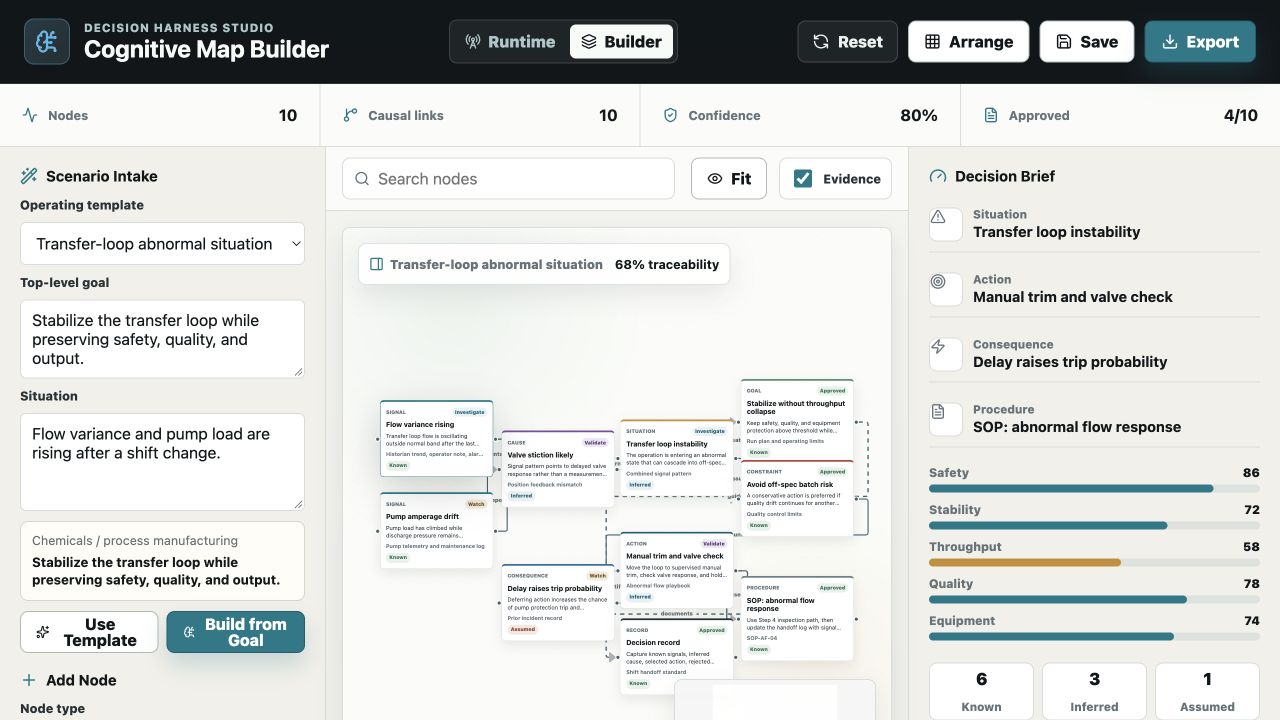
A goal-to-map agent turns the situation into a transparent causal model. Operators can inspect evidence and uncertainty, test scenarios and record the reasoning behind a recommendation.

Business problem + workflow

Signals and possible causes were only part of the decision. Operators also needed to weigh operating goals, constraints, procedures, consequences and uncertainty in a form the next shift could inspect.

  1. 01

    State the abnormal condition and operating goal

  2. 02

    Connect evidence, causes and constraints

  3. 03

    Compare possible actions and consequences

  4. 04

    Record the recommendation and final decision

Agents at work

A goal-to-map agent builds a stable decision structure, a scenario agent evaluates operating states and a record agent preserves the rationale. Every node remains inspectable and editable.

A1

Goal-to-map agentBuilds a transparent map of signals, causes, goals, constraints and actions.

A2

Scenario agentEvaluates telemetry against explicit thresholds and compares consequences.

A3

Decision-record agentPreserves evidence, confidence, uncertainty and the accountable decision owner.

What was built

  • Causal map with confidence and uncertainty
  • Goals, constraints and procedure references
  • Scenario and consequence comparison
  • Decision record with human ownership

What the business can measure

Time to assemble context, missing constraints, scenarios reviewed and decisions with recorded rationale.

What stays with your team

The application does not control equipment or make the operating decision. An accountable person does.

Start with the work

Your agent system does not need to begin as a major software project.

Bring one process that is slow, expensive or hard to track. We can map the job, decide which agents would help and define a first release that is small enough to evaluate.

Talk through the problem